
01
Write the brief
The "Project atmosphere & intent" box is the whole input — no image needed. For example: "A calm coastal family home: warm oak, limewashed walls, natural linen, soft morning light, indoor-outdoor living, understated luxury."
Staging & Mood
Write a brief, get a mood board — and under it, the schedule a mood board is usually missing: a colour palette with hex codes and the materials and finishes to source the look, category by category.
100 credits per board, spec included · New accounts start with 500 free credits.
Real Output
One Mood Board AI run on our own account (focus: Interior mood). The brief is on the left; the app frames it as a design-studio board before it renders.
The prompt
“the living spaces of a modern two-storey hillside house: warm white oak floors, honed travertine, limewashed plaster walls, dark bronze window frames and hardware, natural linen and boucle upholstery, a slate-grey accent, soft evening light, quiet luxury”
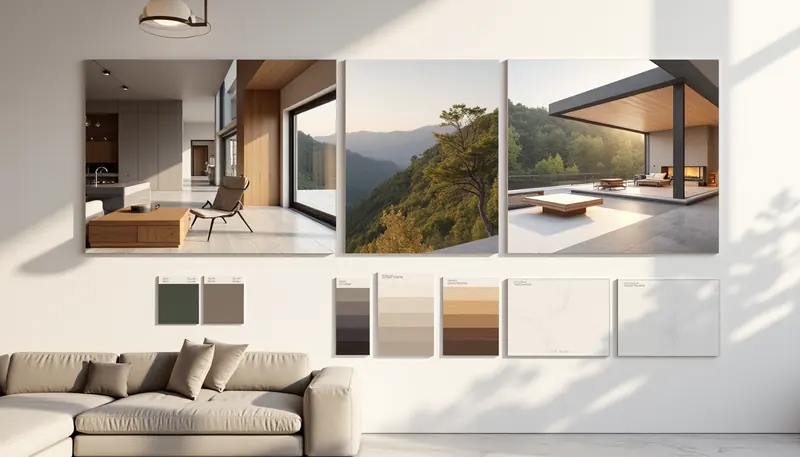 Result
Made with Mood Board AI · 100 credits · Oct 17, 2026
Before: A written brief only — no input image.
One run from the brief alone (focus: interior mood, horizontal), 1,344 × 768. The board came back as cards pinned on a wall in a room rather than a flat collage, and the small labels on the swatches are not readable words; the named materials are in the spec below, not on the board.
The Spec
Shown as Archify wrote it for the board above — the same content Copy spec and Download .txt give you.
Style direction
Modern Hillside Quiet Luxury
This specification anchors a serene, material-rich interior that balances warmth and restraint through natural stone, timber, and soft finishes. Limewashed plaster and honed travertine provide tactile earthiness, while warm white oak and natural linens establish comfort without ostentation, complemented by slate-grey accents and bronze hardware for understated sophistication.
Colour palette
Made with Mood Board AI · 100 credits for the board; the spec is written for it at no extra credit cost. It names materials, not brands, and is a starting sourcing list to check with your builder or supplier — not a construction specification.
How It Works
01
The "Project atmosphere & intent" box is the whole input — no image needed. For example: "A calm coastal family home: warm oak, limewashed walls, natural linen, soft morning light, indoor-outdoor living, understated luxury."
02
Focus: Interior mood, Exterior mood, Materials & palette. Shape: Horizontal, Square, Vertical. Each board is 100 credits.
03
When the board finishes, Archify writes the materials & finishes spec underneath it, matched to your brief: a colour palette with hex codes and a schedule of materials by category. Copy it, download it as a .txt, or regenerate it at no extra credit cost.
Spec Categories
The categories the spec is written in, read from Archify's spec engine.
Pricing
100 credits per board, the same price as every image tool — the materials spec comes with it.
Starter
$29/mo launch price
3,000 credits every month — about 30 boards. Archify watermark included. Unused credits roll over while you stay subscribed.
Pro
$79/mo launch price
10,000 credits every month — about 100 boards. Watermark-free downloads and the video tools. Unused credits roll over while you stay subscribed.
Boards can also be one task in an Autopilot run planned from a project brief — see the AI Architecture Agent. Plans and one-time credit packs are on the pricing page.
Honest Limits
The spec names sourceable materials and finishes — "white oak engineered plank, matte oiled" — and is told never to invent brand names. Choosing the actual products is still your job or your supplier's.
It is a direction to share with a client, builder or supplier. Check every line against the board, the budget and the project before ordering — nothing in it is a performance, code or quantity specification.
The board is a single AI image: photographs and swatches are generated, not real projects or products, and you cannot move a card or swap a photo. Small labels on swatches are not readable words — the names live in the spec.
FAQ
A mood board fixes a project's design direction before drawings begin: a collage of atmosphere photos, material samples and colour chips. Archify's Mood Board AI generates one from a written brief, then adds the part most boards are missing — a list of the actual materials and finishes needed to build the look.
A style name, a short summary tied to your brief, a colour palette with hex codes, and materials grouped by category — for an interior: Flooring, Walls & Paint, Cabinetry & Millwork, Countertops & Stone, Metals & Hardware, Textiles, Lighting; for an exterior: Cladding & Facade, Roofing, Windows & Glazing, Entry & Doors, Hardscape & Landscape, Exterior Lighting. The "Materials & palette" focus uses the interior categories.
No. The board is 100 credits; the spec is written for that board at no extra credit cost, and Regenerate rewrites it for free.
Normally an AI model reads your brief and the finished board image and writes the schedule (the spec on this page was written that way). If that service is unavailable, Archify falls back to its own curated style library matched to the words in your brief, so a finished board always gets a spec.
100 credits per board. On Starter ($29/month launch price, 3,000 credits) that is about 30 boards a month, watermarked; on Pro ($79/month launch price, 10,000 credits) about 100, watermark-free.
New accounts start with 500 free credits. That is 5 boards. Can you use the output for client work? On paid plans, yes — downloads on Pro and Studio are watermark-free and can carry your own studio branding. Free-account output carries the Archify watermark and is licensed for evaluation. Check your local MLS rules before using AI-altered video in a listing; that disclosure is the agent's responsibility.
Keep Going
Restyle a real room photo in the direction the board sets.
Place real products from any store into a room photo.
Turn a material from the spec into a seamless swatch for your models.
A single photoreal concept from a description, instead of a board.
Plan the board, renders and more from one project brief.
New accounts start with 500 free credits. No credit card required to start.