
Comparison · sketch to render

AI rendering vs hand rendering: keep your sketch, let Archify render it

Archify doesn't replace drawing by hand — its Sketch to Image tool starts from your drawing. Scan or photograph the sketch, describe the materials and light, and a photoreal render comes back for 100 credits. Structure Lock is on by default and designed to keep the walls, openings and proportions you drew; the render is an image model's reading of your sketch, so check it against the drawing.

100 credits per render · Structure Lock on by default · New accounts start with 500 free credits.

A Real Run

One drawing in, one render out — and what Archify changed

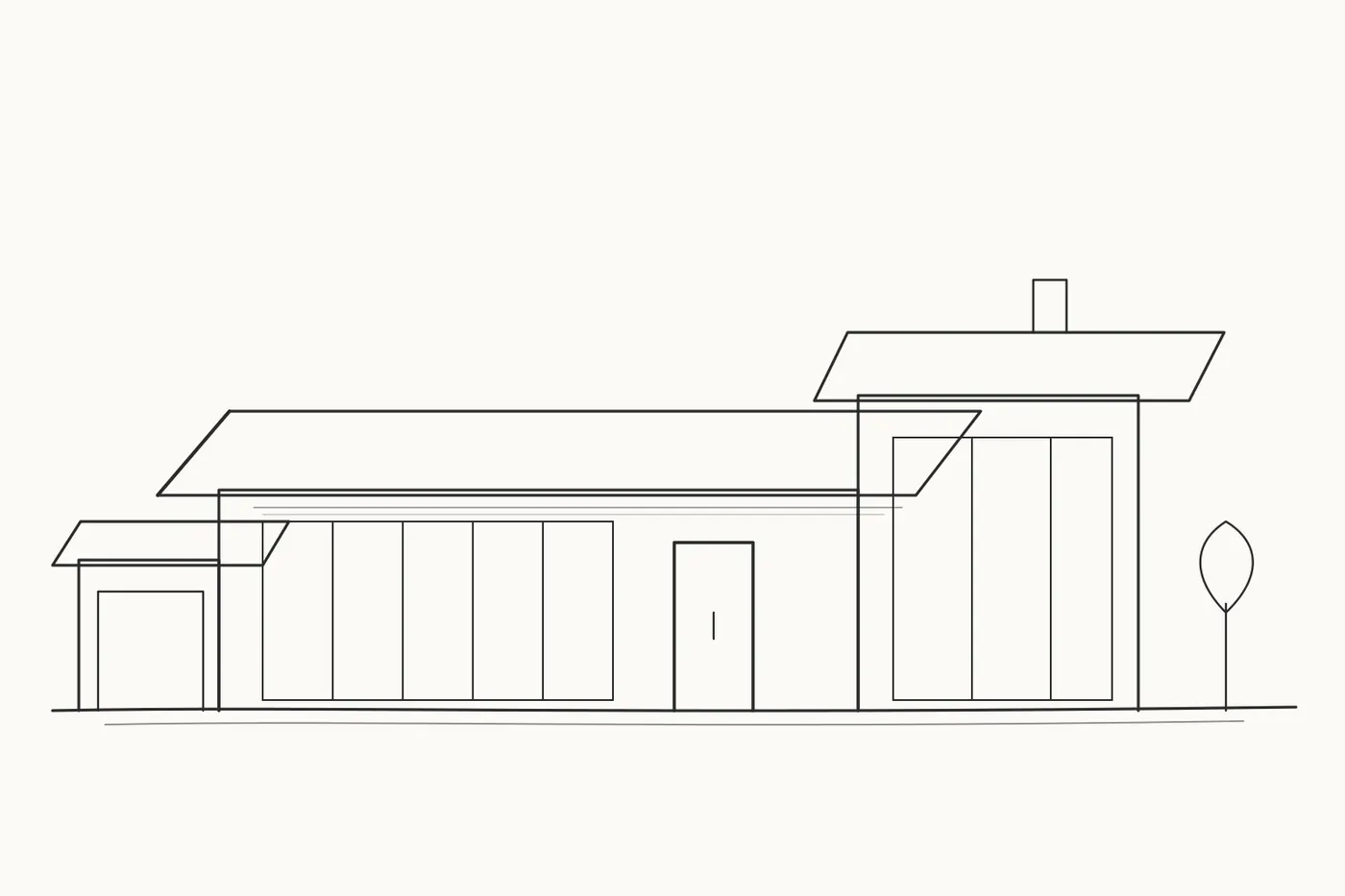
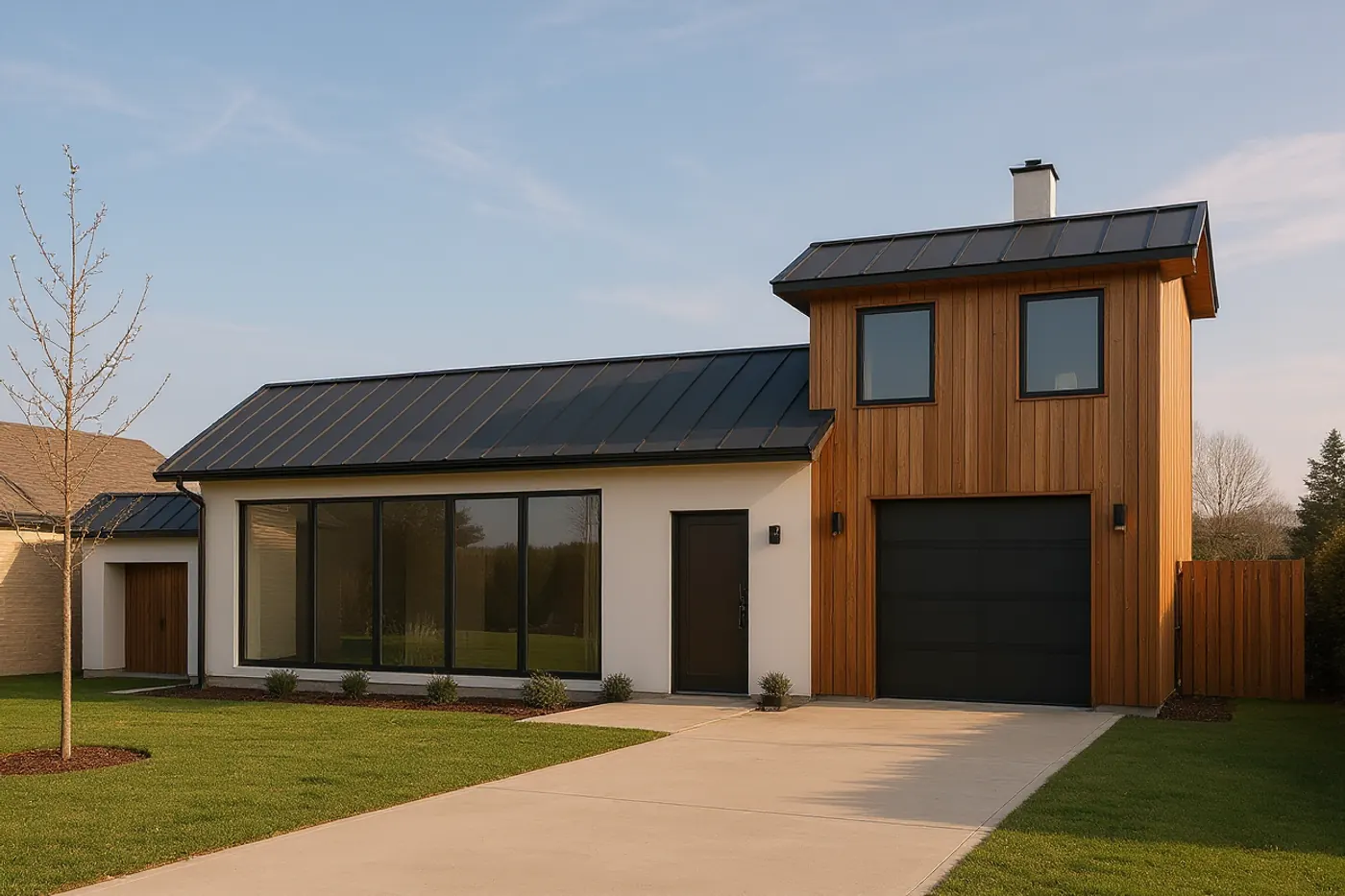
A Sketch to Image run from October 16, 2026: Structure Lock on, the Faithful ↔ Creative slider at its 92% default, the Architectural style, and a one-paragraph prompt for materials and light. The input was a digital line drawing made as a test input, not a hand sketch — a scan or phone photo of your own sketch goes into the same upload.

Black line drawing of a single-storey house: a small left wing with a garage door, a long middle wing with a five-panel window wall and a front door, and a taller right wing with a full-height window and a chimney
The drawingInput · the drawing this Archify run was given — a digital line drawing, not a hand sketch
Photoreal render of the same house from the drawing: white render walls, a cedar-clad tall wing with a chimney, dark metal roofs, a five-panel window wall, a lawn and a concrete drive
The renderMade with Sketch to Image · 100 credits

What the AI changed

The three volumes, the roof slabs, the long window wall and the chimney follow the drawing. The prompt asked for a drive to the garage, and Archify's render put a garage door into the tall wing's full-height window, with two windows above it that make the wing read as two storeys; the small left wing's garage door became a timber door, and a neighbouring house appeared at the left edge.

What Changes

What changes when Archify does the rendering

Your sketch stays the design

Sketch to Image takes a scan or photo of a hand sketch, or a digital line drawing. The drawing is your input; Archify adds materials, light and a setting.

A reading, not a tracing

Structure Lock is on by default and the Faithful ↔ Creative slider starts at 92% (mostly faithful). Archify raised that default after a measured run: at the old setting, a sketch of a single-storey house came back with a second storey and a moved chimney. Even at 92%, the run above added two windows above the tall wing's new garage door.

One image per run

Each Archify run is 100 credits and returns one image. Another view, another material or another light is another run.

Photoreal, not hand-drawn

Sketch to Image renders toward a photograph. When we tested a watercolour preset on Archify's exterior render tool in August 2026, it came back as a desaturated photograph — so Archify offers no marker, ink or watercolour style. If the drawing itself is your presentation, keep your pen for it.

Plans drawn by hand, too

Archify's Floor Plan Render turns a scanned or hand-drawn floor plan into a coloured, furnished presentation plan for 100 credits, designed to keep the wall layout.

Learn more →

Or build it as a model

Archify's free Design Studio can start from a photo of a printed plan: rectangular rooms become walls, a placeholder front door is added, and no other openings are detected.

Learn more →

How It Works

From your sketch to an Archify render in three steps

01

Scan or photograph the sketch

Any image file works in Sketch to Image: a scan, a phone photo or a digital drawing.

02

Describe it, keep Structure Lock on

Write a short prompt for materials, light and setting, pick a rendering style (Architectural, Photorealistic, Artistic) and leave Structure Lock ticked — it is on by default.

03

Check it against your drawing

Compare the render with your sketch before you show it. If it drifted, move the slider toward Faithful and run again — 100 credits a run.

Honest Limits

What Archify's sketch rendering doesn't do

It can change what you drew

The run above turned a full-height window into a garage door with two windows above it, and a garage door into a timber door. Archify's render is designed to keep your drawing, not guaranteed to — check every one.

It is one view

An Archify render is one picture of one view. For several views of the same design, model it in the free Design Studio and render from saved cameras.

Learn more →

Watermark and licence

Free and Starter output carries the Archify mark; watermark-free downloads start at Pro ($79/month). Free-account output is licensed for evaluation.

Pricing

What sketch rendering costs on Archify

Sketch to Image is 100 credits a render — counted below in renders a month.

Starter

$29/mo launch price

3,000 credits every month — about 30 sketch renders. Archify watermark included. Unused credits roll over while you stay subscribed.

Pro

$79/mo launch price

10,000 credits every month — about 100 sketch renders. Watermark-free downloads and the video tools. Unused credits roll over while you stay subscribed.

The Design Studio is free on every plan, and credit packs top up any plan. See current plans and one-time credit packs.

FAQ

AI rendering vs hand rendering, answered

Will AI rendering replace hand rendering?+

Not on Archify. Sketch to Image starts from a drawing you made, and Archify has no hand-drawn render style — it renders toward a photograph. Your sketch stays the design; the render is one reading of it.

Can Archify make my render look hand-drawn?+

No. Sketch to Image renders toward a photograph, and when we tested a watercolour preset on Archify's exterior render tool in August 2026, it came back as a desaturated photograph — so there is no marker, ink or watercolour option.

Will the render keep the building I drew?+

Designed to, not guaranteed to. Structure Lock is on by default and the slider starts at 92%, but it is an image model: on this page's run it turned a full-height window into a garage door with two windows above it. Push the slider toward Faithful if a render reinterprets too much, and check every render against your drawing.

What kind of sketch can I upload?+

Any image file — a scan or phone photo of a hand sketch, or a digital line drawing. The run on this page used a digital line drawing.

How much does it cost?+

100 credits a render. Starter is $29/month (launch price) for 3,000 credits (about 30 renders, with the Archify watermark); Pro is $79/month (launch price) for 10,000 (about 100, watermark-free).

Is there a free way to try it?+

New accounts start with 500 free credits. That covers 5 sketch renders, with the Archify watermark. On paid plans, yes — downloads on Pro and Studio are watermark-free and can carry your own studio branding. Free-account output carries the Archify watermark and is licensed for evaluation. Check your local MLS rules before using AI-altered video in a listing; that disclosure is the agent's responsibility.

Keep Going

Related tools and guides

Render your first sketch free

New accounts start with 500 free credits. No credit card required to start.

Start Free