
100 credits a photo · every plan
Day to dusk
Turn a daytime exterior into a dusk shot from the same photo and the same camera. Small things can drift — check planters, pools and roof edges before you publish.
Learn more →Archify for Real Estate
Turn a day exterior to dusk, furnish an empty room with real products, review a whole shoot at once and fix the photos one by one, then cut a listing video in 16:9 and 9:16. Every price is per photo, in credits — and Standard Video AI is on every plan, free included.
Day to Dusk 100 credits · Place in Room 25 credits · New accounts start with 500 free credits.
Real Output
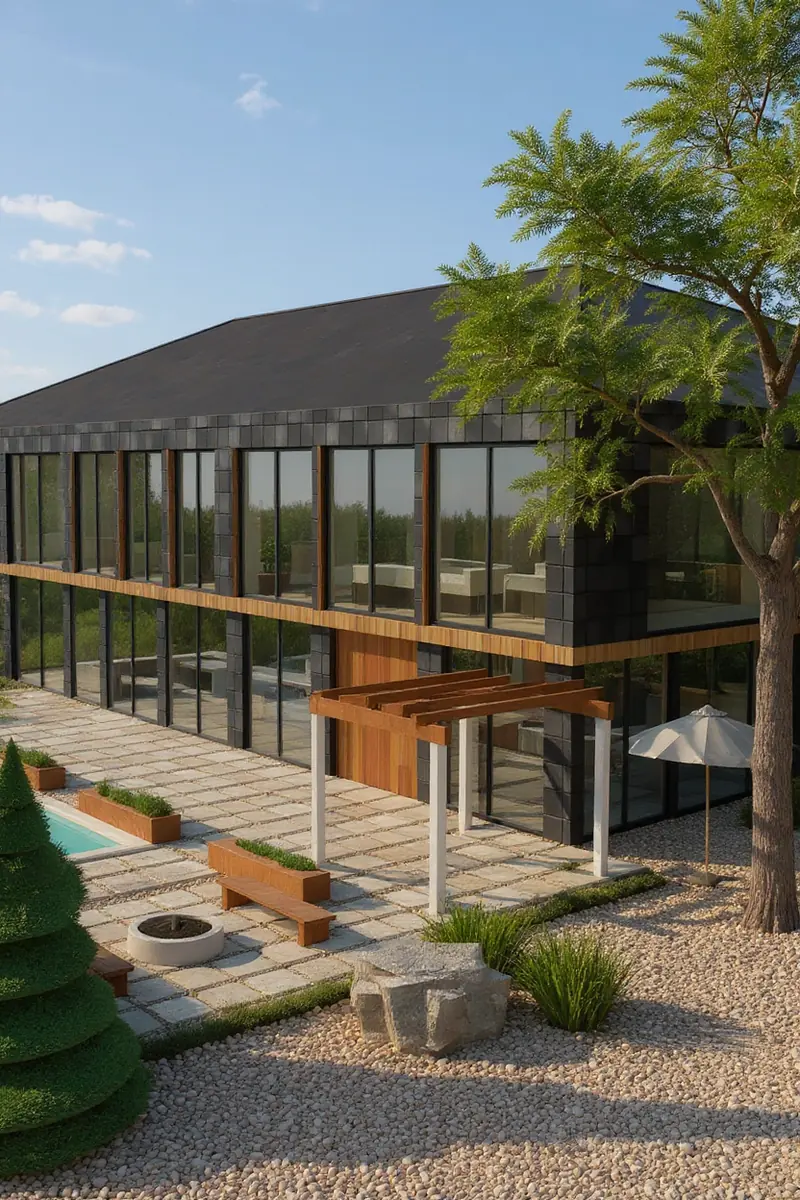
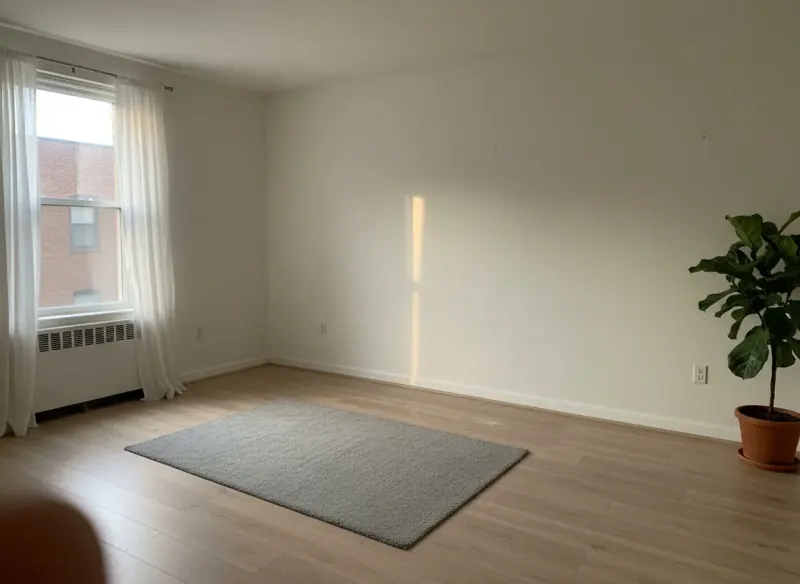
A day render turned to dusk on the same camera, and an empty demo room furnished with a armchair product photo and a sofa from the product library. Drag each handle to compare.
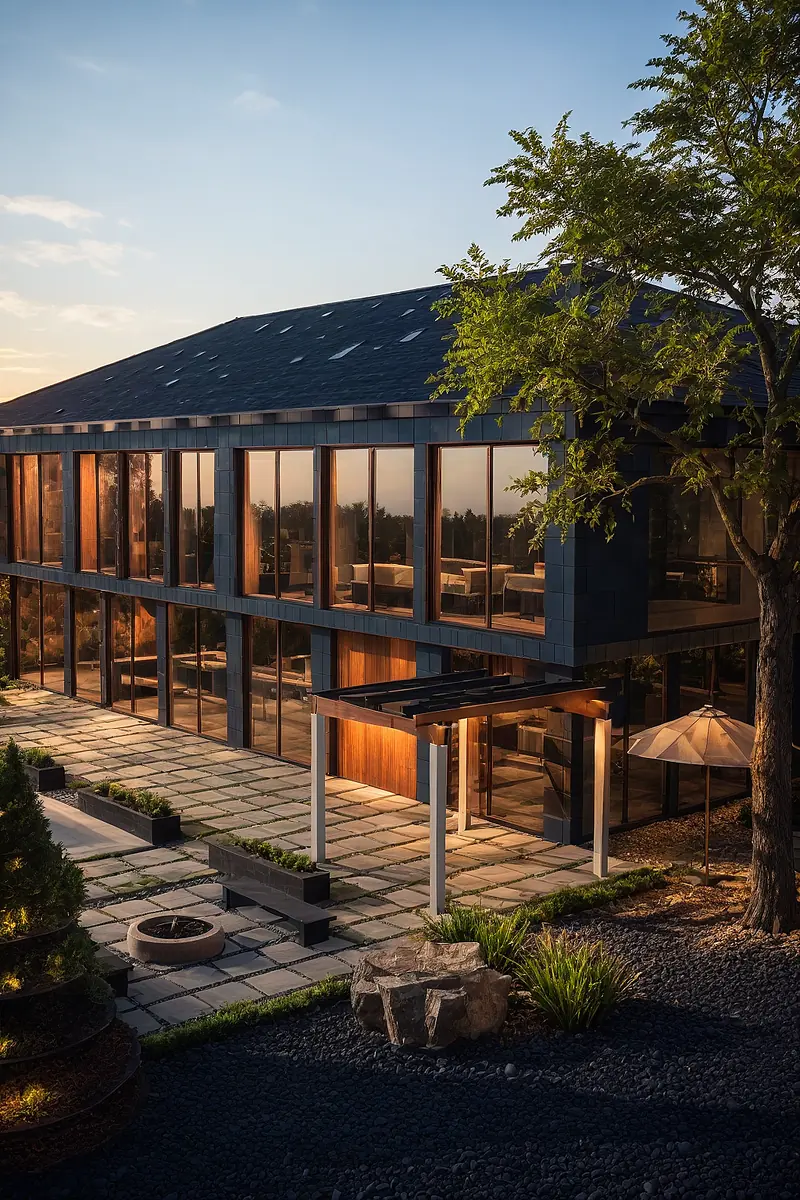
Made with Day to Dusk · 100 credits · Oct 16, 2026
Before: A daytime render of our flagship demo house, rendered from its Design Studio model · Made with Sketch to Image · 100 credits.
Same render, same camera. Small things drift: the planters turn black and the pool at the far left reads as a pale slab.
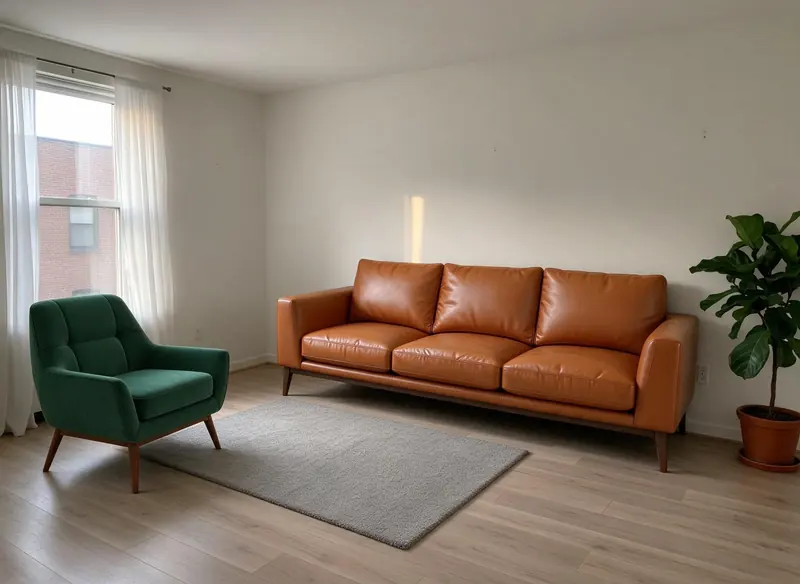
Made with Place in Room · 25 credits · Oct 15, 2026
Before: A demo room photo, plus a velvet armchair product photo and a tan leather sofa from the Product Studio library.
The live production run from launch day: one uploaded armchair photo and one Product Studio library sofa.
Photo Edits
100 credits a photo · every plan
Turn a daytime exterior into a dusk shot from the same photo and the same camera. Small things can drift — check planters, pools and roof edges before you publish.
Learn more →25 credits an image · every plan
Upload the room and up to 4 product photos — a store listing, a screenshot or a cutout — and get one photoreal image with them placed in the room. Sizes are estimates.
Learn more →100 credits a photo · every plan
Sharpen and upscale a soft listing photo or render. It is designed to keep the composition; small details can be redrawn.
Learn more →Before you publish
Most MLS systems and real estate boards require virtually staged photos to be labeled as such in the listing — rules vary by market, so check your local MLS policy. That disclosure is on you as the listing agent or photographer; Archify doesn't add an MLS disclosure label automatically.
The Whole Listing
Free to review · every plan
Add up to 50 photos of one property. Archify identifies each room and flags problems for free, then runs only the fixes you approve — one fix per photo, such as Day to Dusk or Enhance, at that tool's normal price. Failed fixes refund automatically.
600 credits a photo · Pro and up
3–10 photos of one home become one listing video with a slow camera move on each room: a Horizontal 16:9 cut and a Vertical 9:16 cut. Each photo is one shot; the cuts, a written voiceover script and a caption are free. Silent by design — add your own music.
350 credits a clip · every plan, free included
Animate one finished photo or render into a short clip — on every plan, including the free account. Camera paths and walkthroughs are the Pro video tools.
Learn more →Free · every plan
For a new build or a remodel drawn in Design Studio: one click captures a 360° stop in each room and shares one link buyers walk door to door. It is the drawn model in the Studio's real-time look — not your listing photos and not a photoreal render.
Open Houses
Every shared design, model, tour, panorama and scan link doubles as a lead form, and the open-house QR poster tags each visitor as an open-house lead in Clients & Leads. No credits, on every plan.
See the four flows we re-checked on production — a lead from a shared link, a quote accepted on a phone, the open-house QR and a client approval — on Client Tools & CRM. A sample 360° tour of our flagship house: open the tour.
Pricing
Day to Dusk is 100 credits a photo, Enhance 100 and Place in Room 25 credits an image.
Starter
$29/mo launch price
3,000 credits every month — about 30 dusk edits. Archify watermark included. Unused credits roll over while you stay subscribed.
Pro
$79/mo launch price
10,000 credits every month — about 100 dusk edits. Watermark-free downloads and the video tools. Unused credits roll over while you stay subscribed.
Listing Showcase and the camera-path video tools come with Pro and up. Compare every plan on the pricing page.
Good To Know
Most MLS systems and real estate boards require virtually staged photos to be labeled as such in the listing — rules vary by market, so check your local MLS policy. That disclosure is on you as the listing agent or photographer; Archify doesn't add an MLS disclosure label automatically.
Place in Room places the products where they read naturally; their sizes are estimates. Check real dimensions before anyone buys, and keep the unedited photo on file.
Day to Dusk gives a dusk sky, not a night one. On our own test the sky stayed blue at the top and small materials drifted, so check every edit before it goes on a listing.
Standard Video AI is on every plan. Listing Showcase and the other camera-path video tools need Pro ($79/month), Studio or a multi-seat plan; a Pro or Studio trial keeps them, with the output marked.
FAQ
On paid plans, yes — downloads on Pro and Studio are watermark-free and can carry your own studio branding. Free-account output carries the Archify watermark and is licensed for evaluation. Check your local MLS rules before using AI-altered video in a listing; that disclosure is the agent's responsibility.
Most MLS systems and real estate boards require virtually staged photos to be labeled as such in the listing — rules vary by market, so check your local MLS policy. That disclosure is on you as the listing agent or photographer; Archify doesn't add an MLS disclosure label automatically.
Listing Batch takes up to 50 photos of one property. Reviewing them — room detection and the problem flags — is free; each fix you approve runs once on its photo at that tool's normal price (Day to Dusk is 100 credits), and a failed fix refunds automatically.
Listing Showcase is 600 credits per photo, 3–10 photos per video — so 1,800 to 6,000 credits, on Pro and up. The 16:9 and 9:16 cuts, the voiceover script and the caption are free. For a single animated photo on any plan, Standard Video AI is 350 credits a clip.
No. The free 360° tour is captured from a house drawn in Archify's Design Studio, so it suits pre-construction and remodel listings. It shows the drawn model in the Studio's real-time look; it is not a photo tour of an existing home.
New accounts start with 500 free credits. That covers a few dusk edits or furnished rooms, or a Standard Video AI clip, before you pick a plan — no credit card required to sign up.
Keep Going
The dusk tool in depth, with the full before and after.
Place in Room: real products in a photo of the room.
Every video tool, from one animated photo to a full tour.
Leads from shared links and open-house QR codes, free.
Sharpen and upscale a soft photo or render.
Restyle rooms, mood boards and real products in place.
New accounts start with 500 free credits. No credit card required to start.