
01
Upload the finished image
A render from Archify or any render engine, or a photo. Upscale last — after the edits and the enhancer pass — so you never pay to enlarge a version you will throw away.
Edit & Enhance
Upload a finished render or photo and the 4K Upscaler enlarges it 2x or 4x, adding fine detail as it goes — for boards, prints and big screens. Designing in Design Studio? The Hi-res photo button is free.
100 credits per run, either scale · New accounts start with 500 free credits.
Real Output
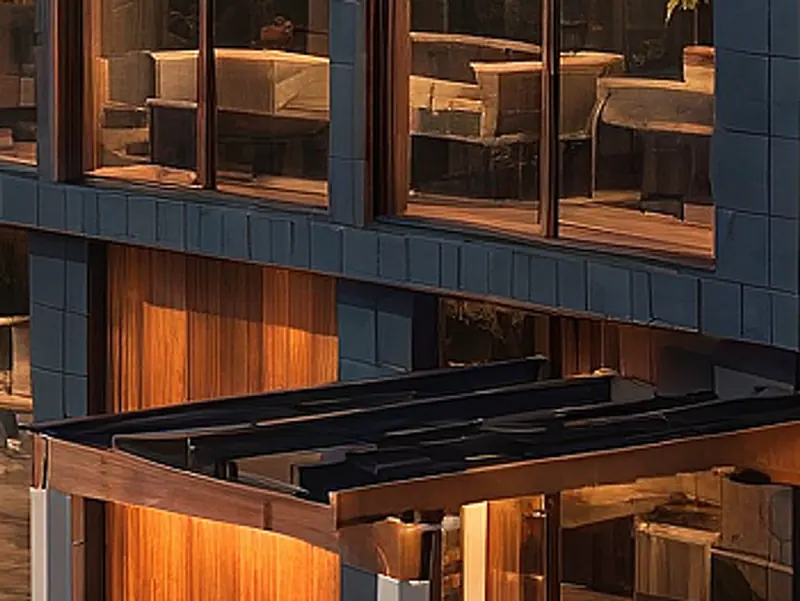
One 4K Upscaler run at 4x on our flagship demo house at dusk. Left: the original, blown up the ordinary way. Right: the upscaled file at its own pixels. Drag the handle to compare.
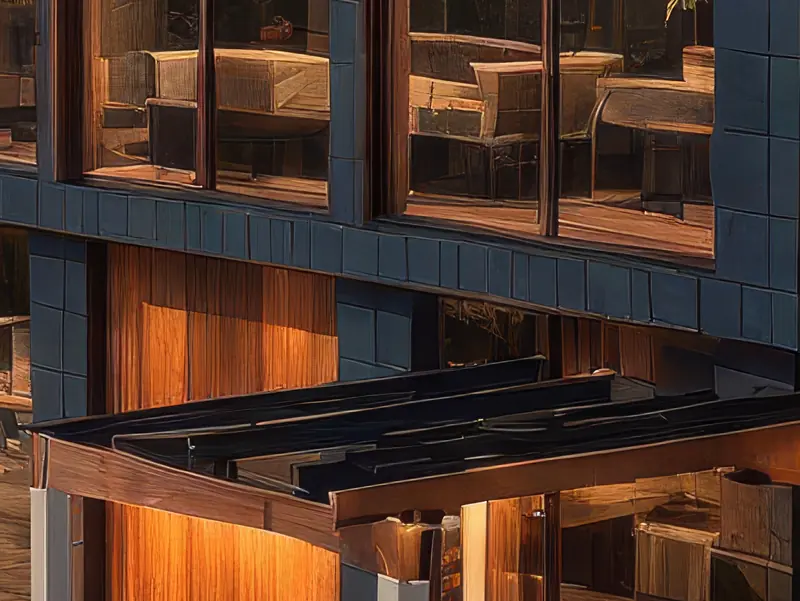
Made with 4K Upscaler · 100 credits · Oct 16, 2026
Before: Our flagship demo house at dusk, 1,024 × 1,536 · Made with Day to Dusk · 100 credits.
A crop at the same spot: left is the 1,024 × 1,536 input enlarged 4× (Lanczos), right is the 4,096 × 6,144 output at its own pixels.
How It Works
01
A render from Archify or any render engine, or a photo. Upscale last — after the edits and the enhancer pass — so you never pay to enlarge a version you will throw away.
02
2x is the default. The scale multiplies both sides, so the output's size is the input's size times the scale.
03
100 credits per run, either scale. The result is saved to your History like every other run.
Two Ways
100 credits
For any image: an AI upscale 2x or 4x that adds detail as it enlarges — crisper mullions, timber grain and lit windows than a plain resize. Measured on the pair above: 1,024 × 1,536 in, 4,096 × 6,144 out at 4x.
Free
For a house you designed in the free Design Studio: the Hi-res photo button saves a PNG of your 3D view at 2× the on-screen pixel size. No AI and no credits — it is your model, drawn again at the larger size.
Pricing
100 credits per upscale at either scale — the same as every image tool.
Starter
$29/mo launch price
3,000 credits every month — about 30 upscales. Archify watermark included. Unused credits roll over while you stay subscribed.
Pro
$79/mo launch price
10,000 credits every month — about 100 upscales. Watermark-free downloads and the video tools. Unused credits roll over while you stay subscribed.
The Design Studio Hi-res photo button is free on every account. See current plans and one-time credit packs.
Honest Limits
The 4K Upscaler multiplies the pixel dimensions 2x or 4x, so how big the result is depends on what you upload: the example above went from 1,024 × 1,536 to 4,096 × 6,144. Check the output's size before you quote it.
An AI upscale draws new fine detail that fits the image; it cannot recover detail the original never had. At full size the result can look slightly painterly — judge it at the size it will be seen.
Free and Starter output carries the Archify mark, upscaled or not; watermark-free downloads start at Pro.
FAQ
No — the name describes the job, not a fixed output. It multiplies the width and height 2x or 4x, so the size depends on the input. Our run on this page took a 1,024 × 1,536 dusk render to 4,096 × 6,144 at 4x.
2x is the default and enough for most screens and decks. Use the larger scale for print or a large display, on an image that is already the composition you want — both scales cost 100 credits.
If the house was designed in Archify's Design Studio, yes: the Hi-res photo button (in Design Studio's AI tab, next to Render) saves your 3D view at 2× the on-screen size, free. It is a picture of your model, not a photoreal render; for that, render the view and then upscale it.
Last. Fix materials and light with the Render Enhancer (100 credits), remove or replace objects with the eraser or inpainting, and upscale the final keeper once — some of those edits return a smaller image, and the upscale puts the pixels back.
100 credits per run. On Starter ($29/month launch price, 3,000 credits) that is about 30 upscales a month, watermarked; on Pro ($79/month launch price, 10,000 credits) about 100, watermark-free.
New accounts start with 500 free credits. That is 5 upscales. Can you use the output for client work? On paid plans, yes — downloads on Pro and Studio are watermark-free and can carry your own studio branding. Free-account output carries the Archify watermark and is licensed for evaluation. Check your local MLS rules before using AI-altered video in a listing; that disclosure is the agent's responsibility.
Keep Going
Sharpen materials and lighting first, then upscale the keeper.
Remove or replace one object before the final upscale.
Same view, three schemes — the stills on that page were upscaled with this tool.
The free Design Studio, where the Hi-res photo button lives.
New accounts start with 500 free credits. No credit card required to start.