
Archify for Furniture Brands & Retailers

Your Products in Your Customer's Room — Then a Quote They Accept

Show a customer your sofa in their own living room before they buy: let the AI place it, or arrange your own catalog by hand for free. Then turn the room into a priced quote they open on a phone and accept online.

Place in Room 25 credits · arranging and quotes free · New accounts start with 500 free credits.

Real Output

A real Place in Room run

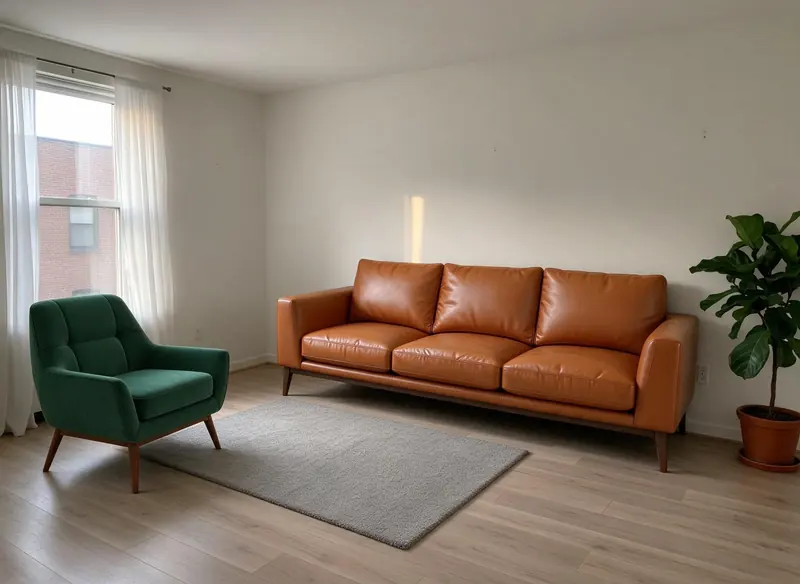
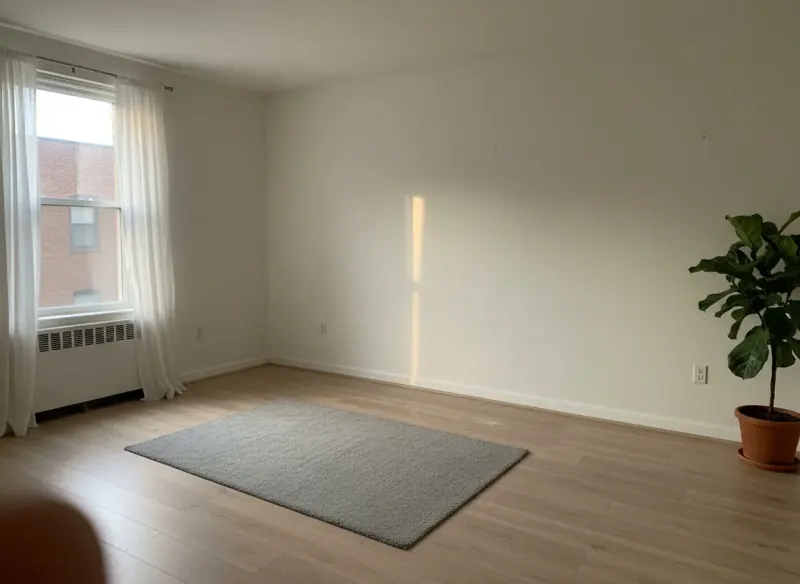
The first production run: an empty demo room, one armchair product photo and one sofa from the Product Studio library. Drag the handle to compare.

The same living room with a green velvet armchair and a tan leather sofa placed on and beside the rug
Empty living room with a window, a grey rug and a fiddle-leaf fig
BeforeAfter
↔

Made with Place in Room · 25 credits · Oct 15, 2026

Before: A demo room photo, plus a velvet armchair product photo and a tan leather sofa from the Product Studio library.

The live production run from launch day: one uploaded armchair photo and one Product Studio library sofa.

Two Ways In

Let the AI place it, or place it yourself

25 credits an image · every plan

Place in Room — the AI places it

Upload the customer's room and up to 4 product photos — your catalog shot, a listing photo, a screenshot or a cutout — and get one photoreal image with the pieces in the room. Sizes are estimates.

Learn more →
Free to arrange · every plan

Product Studio — you place it

Upload your catalog once into your own library. Drop a product onto the customer's room photo, position and size it by hand, and download the composite free. Want it blended into the photo? AI Blend is 100 credits. Or send the same room and products to Place in Room with one click.

Product Studio · Checked On Production

From your catalog to a quote, in one canvas

We ran every step below on production, on our own account, before writing this section: upload, arrange, download, AI Blend, the quote and the hand-off to Place in Room.

  1. 01

    Upload your catalog

    Product photos go into your own library, with an optional price and SKU on each. A PNG cutout on a transparent background works best; a JPG cropped close works too.

  2. 02

    Arrange it in the customer's room

    Upload their room photo and drop the product on it — arranging and the full-size download are free.

  3. 03

    Blend it in, if you want

    AI Blend (100 credits) is designed to match the product to the room's light and shadows and to keep its design and position; small details can shift — on our run the leather read softer and the floorboards were redrawn.

  4. 04

    Turn it into a quote

    Generate quote lists the placed products — up to 25 — with up to 20 labour or delivery lines, markup, a discount, tax and 18 currencies. It lands in Clients & Leads with a link your customer accepts online. Free.

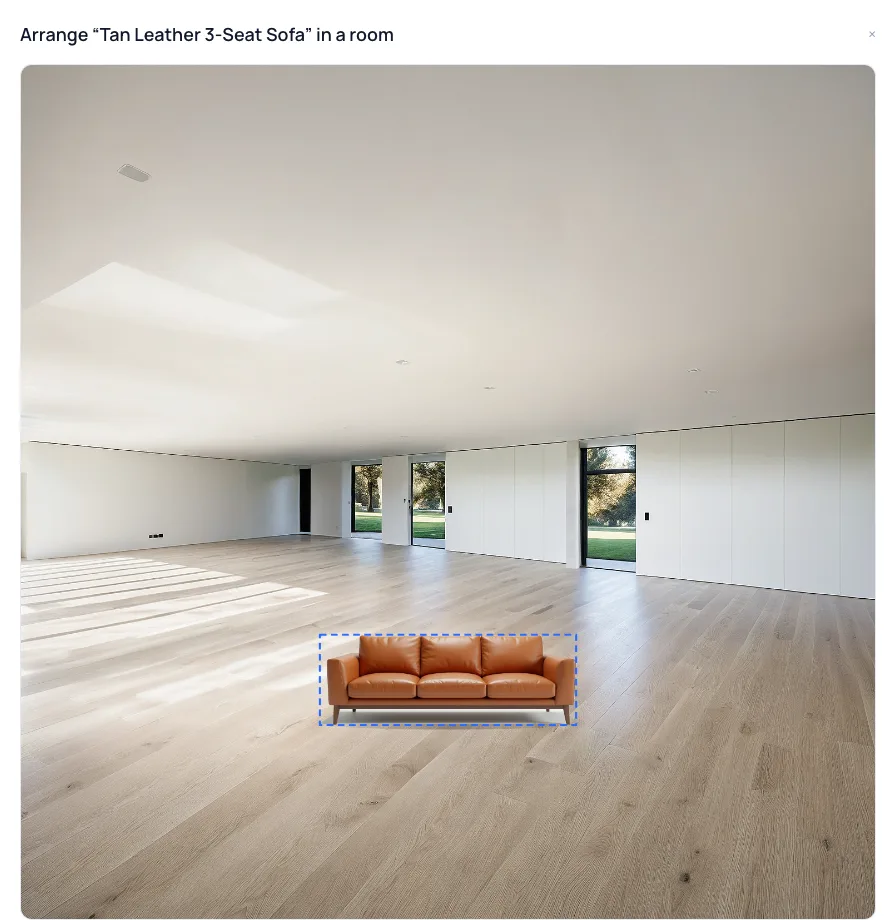
Product Studio's canvas: a tan leather sofa from the product library placed on the floor of an empty room photo

Screenshot · Product Studio canvas

Room: Interior AI · 100 credits · sofa: Imagine AI · 100 credits, saved to the library · arranging free

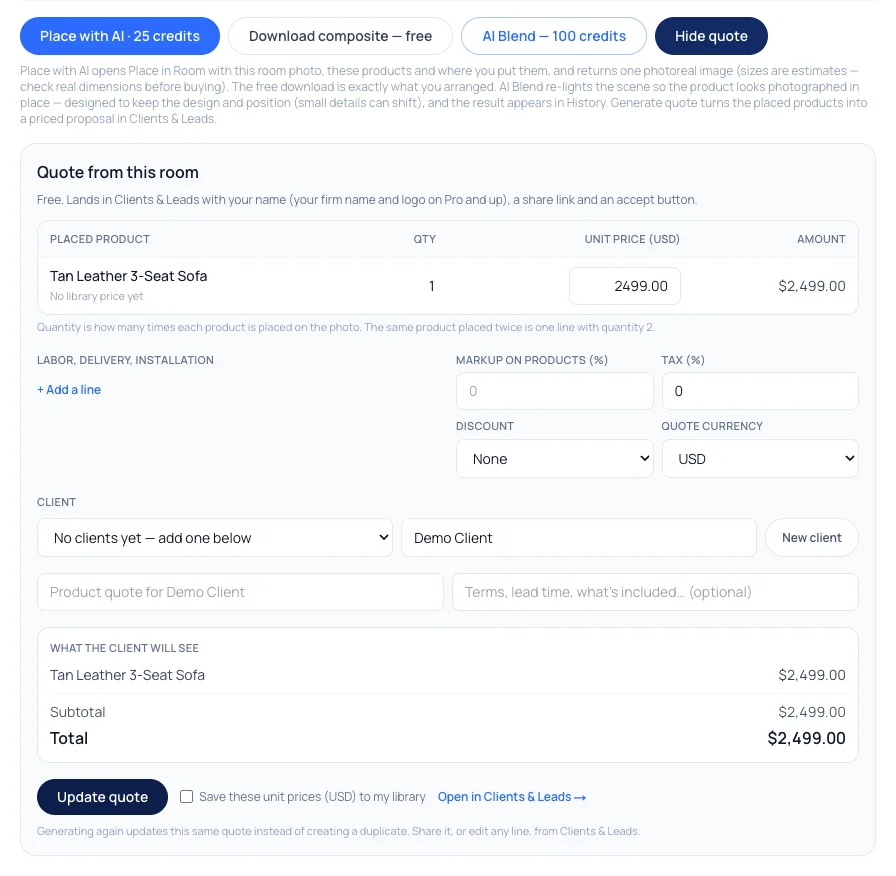
The Quote from this room panel: the placed sofa at a demo price, a demo client name, and the total the client will see

Screenshot · Generate quote

The same room after Generate quote: one placed product at a demo price for a demo client · quotes free

Pricing

What it costs

Arranging, downloads and quotes are free. Place in Room is 25 credits an image; AI Blend is 100 credits.

Starter

$29/mo launch price

3,000 credits every month — about 120 room images. Archify watermark included. Unused credits roll over while you stay subscribed.

Pro

$79/mo launch price

10,000 credits every month — about 400 room images. Watermark-free downloads and the video tools. Unused credits roll over while you stay subscribed.

A sales team can share one credit pool on the multi-seat plans — see the pricing page.

Good To Know

What to know before you show a customer

  • Sizes are estimates

    Neither Place in Room nor the canvas knows the real size of the room or the product. Check real dimensions before anything is ordered.

  • A quote is a proposal, not a payment

    The quote page records Accept or Decline — it doesn't take payment or a signature. Once a customer answers, the answer stands.

  • Your logo on quotes is a Pro feature

    On every plan the quote is headed with your name. Your firm name and logo replace it on the watermark-free plans — Pro ($79/month), Studio and the multi-seat plans — once any free trial has converted.

  • For your team, not a shop widget

    Product Studio and Place in Room are tools your staff use in Archify. There is no button for shoppers to embed on your own website today.

FAQ

Archify for furniture brands, answered

Can I use what I make on the free account with customers?+

On paid plans, yes — downloads on Pro and Studio are watermark-free and can carry your own studio branding. Free-account output carries the Archify watermark and is licensed for evaluation. Check your local MLS rules before using AI-altered video in a listing; that disclosure is the agent's responsibility.

Do I need cutouts of my products?+

Not for Place in Room: any product photo works, including a styled listing photo — only the product is taken. For arranging by hand in Product Studio, a PNG cutout on a transparent background works best, because the canvas places the picture exactly as uploaded.

What does AI Blend do to the picture?+

It runs the arrangement through Archify's Render Enhancer (100 credits) with an instruction to keep every piece where it is and match the room's light. It is designed to keep the design and position, but it redraws the image: on our production run the sofa kept its shape, colour and place, while the leather read softer and the floorboards were redrawn. The free download is exactly what you arranged.

How does the quote reach the customer?+

Generate quote turns the placed products into a priced proposal in Clients & Leads — up to 25 products plus labour and delivery lines, markup, discount, tax, in any of 18 currencies. Share its link; the customer opens it on a phone with no account and accepts or declines, and you get an email. It costs no credits.

Is there a free way to try it?+

Product Studio's library, canvas, download and quotes are free on every account. New accounts start with 500 free credits. That covers several Place in Room images (25 credits each) — no credit card required to sign up.

Keep Going

Related tools and guides

Put your first product in a real room

New accounts start with 500 free credits. No credit card required to start.

Start Free