File Formats

CAD File Import and Export — What Every Format Becomes

Double-line and single-line DXF/DWG plans open as editable walls with an automatic cleanup report: gaps closed, overshoots trimmed, walls straightened, double lines read as one wall with its thickness — and you get the list of fixes before anything is created. Export the sheet set, DXF and IFC free from the Design Studio, along with GLB, CSV schedules and SVG drawings. Below: every format, what it becomes, and the measured results on our test drawings.

Importing and exporting never spend credits · 13 of 13 test drawings read back as drawn · see the measurements

Files In

Drop a file, it lands in the right place

Import & Switch is one drop zone inside the app, routed by file type. Here is what each format becomes.

DWG

Converted to DXF by an outside converter service, then read exactly like the DXF below. The file is sent to that service for the conversion; Archify deletes its own upload copy when the conversion ends.

Lands in: Design Studio — an editable house

Limits: Up to 25 MB; 4 DWG conversions a day per account. Saving the drawing as DXF from your CAD app always works too.

DXF

Walls from single or double lines — a double-line wall becomes one centerline wall with its drawn thickness — doors and windows from swing arcs, door and window blocks and layer names, and room names from the drawing's text. Blocks are expanded up to 6 levels deep; a curved wall becomes straight wall pieces that stay within 25 mm of the curve. Before anything is created you review the list of fixes and which layers become walls, doors, windows or room names.

Lands in: Design Studio — an editable house; a Studio import is one Undo

Limits: Up to 60 MB, read in your browser and never uploaded; the 1,500 longest walls are kept.

PDF

Each page is rendered in your browser. Trace it into a house — rectangular rooms become walls, a placeholder front door is added, and no other openings are detected — or send it to the render tools for a colored presentation plan.

Lands in: Design Studio · Floor Plan Render · render tools

Limits: Tracing is concept-grade: a starting point, not a survey.

PNGJPG

A plan image traces the same way a PDF page does, or goes straight to the render tools as the starting image.

Lands in: Design Studio · Floor Plan Render · render tools

RoomPlan .json

A LiDAR room scan: walls at the scanned heights, doors and windows on their walls, room names carried over, metres converted for you.

Lands in: Design Studio · 3D Workshop

Limits: RoomPlan JSON only — a USDZ scan is a mesh and can't be parsed. Expect to nudge a corner or two.

PLYSPZSPLATSOG

A Gaussian-splat scan from a phone or drone opens in a scan viewer you can share.

Lands in: Scan viewer + share link

Limits: Up to 45 MB each. A view-and-share layer, not editable geometry.

OBJSTLGLBUSDZ

A 3D model gets an interactive viewer, a client share link and AR on phones; OBJ and STL are converted to GLB. A USDZ is read only as the iPhone AR copy of a model you import with it, never on its own.

Lands in: History's 3D viewer · client share links

CSVTSV

A table placed on the plan in the Design Studio — or paste the rows straight from a spreadsheet.

Lands in: Design Studio — joins the open design, never replaces it

Can't read it? Export it.

Closed project files — .rvt, .skp, .3dm, .pln, .vwx, .plan — can't be read directly: export OBJ/GLB/DXF from your 3D app. For an editable house, export a floor-plan view as DXF. Drop one of those files on Import & Switch anyway and it shows the export steps for that format instead of an error. IFC is export-only for now.

Real Output

A plan image in, a presentation plan out

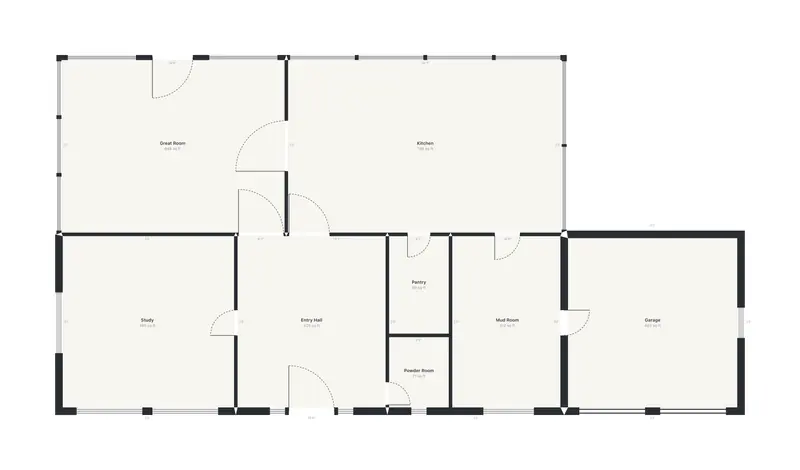
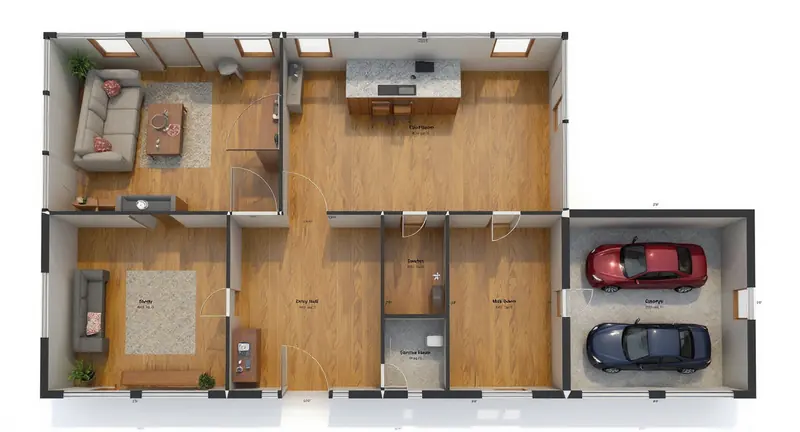
The PNG / PDF route, on one real run on our own account: a Design Studio plan view sent to Floor Plan Render. The caption says what the render got wrong.

Black and white ground-floor plan with a Great Room, Kitchen, Study, Entry Hall, Pantry, Powder Room, Mud Room and a GarageBefore
The same plan rendered top-down with oak floors, a sofa and rug in the Great Room, a kitchen island with stools, a desk in the Study and two cars in the GarageAfter

Made with Floor Plan Render · 100 credits · Oct 16, 2026

Before: Our flagship demo house's ground-floor plan exactly as Design Studio draws it (its plan view), no credits.

Walls and most door swings follow the plan; the Great Room's top-wall door lost its swing, and the Study got a sofa instead of the desk the prompt asked for. The room labels come back as illegible text, so add your own on the board.

Measured, Not Promised

What the importer read back from our test drawings

These are the import test suite's drawings — built to look the way offices draw — not customer files. Last measured Oct 19, 2026; the tests fail if a number here stops being true. Each card says what is in the file, what came back, and the fix list the import review shows.

The automatic cleanup, at its default tolerances

  • Closes corner gaps up to 75 mm and extends a wall end up to 150 mm to meet a wall.
  • Trims lines that run past a corner back to the wall they cross.
  • Straightens lines drawn within 1° of square to exactly square.
  • Merges duplicate, overlapping and broken lines; drops stray slivers under 300 mm.
  • Reads two parallel lines 75–400 mm apart as one wall of that thickness, and a 600–2,400 mm break in it as a door or window.

Dirty geometry

A corner left open

A 20 × 15 ft room drawn with single lines, one corner left 1 in open.

Read back

4 walls · 1 room

Import review — healed 1 issue

  • Welded 1 corner gap under 75 mm

Matches the drawing — every defect drawn into it fixed.

Lines that run past the corner

The same room with every line running 3 in past its corner.

Read back

4 walls · 1 room

Import review — healed 8 issues

  • Trimmed 8 overshoots back to the wall they cross

Matches the drawing — every defect drawn into it fixed.

A wall drawn slightly off square

The same room with one wall drawn 0.5° off square.

Read back

4 walls · 1 room

Import review — healed 3 issues

  • Welded 2 corner gaps under 75 mm
  • Straightened 1 wall drawn within 1° of square

Matches the drawing — every wall exactly square; every defect drawn into it fixed.

How offices draw

Walls drawn as two lines

A 20 × 15 ft room whose walls are drawn as two lines 6 in apart.

Read back

4 walls · 1 room · 266 sq ft · walls 6 in thick

Import review — nothing to heal

  • Read 4 double-line walls as centerline walls with their drawn thickness

Matches the drawing.

A block definition that is never placed

A room plus a 2-line block definition that is never inserted into the plan.

Read back

4 walls · 1 room

Import review — nothing to heal

A clean drawing: the importer changed nothing.

Matches the drawing.

Archify's own DXF, read back

The DXF the Design Studio exports for its sample house, imported again.

Read back

12 walls · 5 rooms, all named · 5 doors · 7 windows · 1 garage door · 1,427.5 sq ft

Import review — nothing to heal

  • Read 12 double-line walls as centerline walls with their drawn thickness

Matches the drawing — the same floor area as the model it was exported from.

A residence with blocks, notes and furniture

A house plan in inches: 3 wall thicknesses as double lines, door and window blocks (one mirrored), room names in formatted multiline text, dimensions, a title block, wall hatch and furniture blocks.

Read back

17 walls · 5 rooms, all named · 6 doors · 10 windows · 1,323 sq ft · walls 4.5, 6 and 8 in thick

Import review — nothing to heal

  • Read 17 double-line walls as centerline walls with their drawn thickness

Matches the drawing.
Office drawing with gaps and overshoots

A 40 × 30 ft residence drawn office-style (trimmed wall poché, door blocks rotated and mirrored, window blocks, room-name text), with 2 corners left open and 2 lines running past their corners.

Read back

16 walls · 5 rooms, all named · 6 doors · 7 windows · 1,078 sq ft · walls 4.5 and 8 in thick

Import review — healed 4 issues

  • Read 16 double-line walls as centerline walls with their drawn thickness
  • Welded 2 corner gaps under 75 mm
  • Trimmed 2 overshoots back to the wall they cross

Matches the drawing — every door hinged and swinging as drawn; every defect drawn into it fixed.

Exterior walls drawn with four lines

The same residence with its exterior walls drawn as 4 lines (veneer, air gap, stud and lining).

Read back

16 walls · 5 rooms, all named · 6 doors · 7 windows · 1,078 sq ft · walls 4.5 and 8 in thick

Import review — nothing to heal

  • Read 16 double-line walls as centerline walls with their drawn thickness

Matches the drawing — every door hinged and swinging as drawn.

Layer names in another language

The same residence with Spanish layer names and no English wall layer, plus dimensions, a title block and notes.

Read back

16 walls · 5 rooms, all named · 6 doors · 7 windows · 1,078 sq ft · walls 4.5 and 8 in thick

Import review — nothing to heal

  • Read 16 double-line walls as centerline walls with their drawn thickness

Matches the drawing — every door hinged and swinging as drawn.

Furniture blocks before the walls

The same residence with 200 chair blocks written into the file before the first wall line.

Read back

16 walls · 5 rooms, all named · 6 doors · 7 windows · 1,078 sq ft · walls 4.5 and 8 in thick

Import review — nothing to heal

  • Read 16 double-line walls as centerline walls with their drawn thickness

Matches the drawing — every door hinged and swinging as drawn.

A file whose units are wrong

The same residence drawn in inches, in a file whose header says metric.

Read back

16 walls · 5 rooms, all named · 6 doors · 7 windows · 1,078 sq ft · walls 4.5 and 8 in thick

Import review — nothing to heal

  • Read 16 double-line walls as centerline walls with their drawn thickness

Matches the drawing — every door hinged and swinging as drawn; read as inches, and the review says the file's header disagreed.

An apartment-block grid

A 22 × 22 grid of 12 ft rooms with double-line walls, a door into every room, a window on each column's south wall and a name in every room.

Read back

1,012 walls · 484 rooms, all named · 483 doors · 22 windows · 64,918.8 sq ft · walls 4.5 and 8 in thick

Import review — nothing to heal

  • Read 1,012 double-line walls as centerline walls with their drawn thickness

Matches the drawing.
What it leaves out

Furniture, dimensions, hatches and title blocks are not imported. Curved walls come in as straight pieces that stay within 25 mm of the curve. Plan tracing from images and PDFs is concept-grade. On the office drawing above — 2 open corners and 2 overshooting lines — the import review healed 4 issues (2 gaps welded, 2 overshoots trimmed); a real drawing can need more, and anything the cleanup can't settle is yours to fix with Trim, Extend and Fillet in the Studio.

Files Out

Export from the Design Studio, free

Every export below is on the Design Studio's Export menu and never spends credits. On the free account, Starter and Student, the sheets, DXF and GLB carry the Archify mark; Pro and up export them clean from the plan's first payment.

DXF

Every level in one file — on L1-, L2-… layers when there is more than one, the prefix the importer reads back — or one file per level in a .zip. Each level carries walls, opening marks, door leaves with their swing arcs, furniture outlines, stairs with their risers and an UP arrow, room names with their areas, dimensions (as lines and text), redlines and tables, each on its own layer, in the design's units. It reads back through the same importer — Archify's own DXF re-imports as 12 walls, 13 openings and 5 rooms (measured above).

Export menu: Export DXF · Export DXF per level (.zip)

IFC4

A coordination model, not an authoring round trip: storeys, walls with real openings for their doors and windows, floor slabs, the roof, stairs as massing and rooms as spaces with their net floor area, in the design's colors and materials. Walls, doors, windows, storeys and stairs take their GlobalId from the model's own ids, so every surviving element keeps its id when you edit and re-export; rooms key on their name tag or their walls, and roof planes are re-solved if the roof type changes.

Export menu: Export IFC

GLB

The 3D house, for any 3D or real-time app.

Export menu: Export 3D (.glb)

PDF

The sheet set: plan and elevation sheets at a real architectural scale, with a title block and a scale bar.

Export menu: Print sheets (PDF)

SVG

Four elevations and two building sections, straight from the model.

Export menu: Export elevations · Export sections

CSV

Door, window and room schedules — and the sun study's hours of direct sun per room.

Export menu: Export schedules (.csv)

.json

The whole design as one portable file you can keep or open again.

Export menu: Download design file

USDZ

3D models generated in 3D Studio download as GLB, OBJ, USDZ and STL when the generator returns them. Design Studio houses export GLB.

Where: 3D Studio downloads

There is no DWG export: DXF is the exchange format. IFC is a coordination export — Archify does not read IFC back in.

For renders

Use Archify from Claude (MCP)

The Archify API is also an MCP server, so Claude — or any MCP client — can list the API's 19 image tools and its video tool, start a render and fetch the result in conversation, with the same credits and automatic refunds as the app. It needs a Studio or multi-seat plan and an API key. Set your client to confirm before it renders: every render spends credits.

Read the API docs

FAQ

CAD file import and export, answered

Can Archify open a DWG file?+

Yes. A DWG up to 25 MB is converted to DXF by an outside converter service and then read like any DXF — walls, doors, windows and room names — after a cleanup you review fix by fix. Each account gets 4 DWG conversions a day. A DXF has no daily limit and never leaves your browser.

What happens to walls drawn as two lines?+

Two parallel lines 75–400 mm apart are read as one centerline wall with that thickness, and a 600–2,400 mm break between them becomes an opening — a door when a swing arc or a door block is there, a window when window lines are. On the test room drawn as lines 6 in apart the importer read back 4 walls and 1 room, every wall 6 in thick.

What does the automatic cleanup fix — and what doesn't it?+

It closes corner gaps up to 75 mm, extends a wall end up to 150 mm to meet a wall, trims overshoots back to the wall they cross, straightens lines within 1° of square, merges duplicate and overlapping lines, and drops stray slivers under 300 mm — and lists each fix before you import. Furniture, dimensions, hatches and title blocks are left out, curved walls come in as straight pieces that stay within 25 mm of the curve, and a messy drawing can still need hand fixes afterwards.

Which formats can't Archify read?+

Project files such as .rvt, .skp, .3dm, .pln, .vwx, .plan can't be read directly: export OBJ/GLB/DXF from your 3D app — a floor-plan view as DXF for an editable house — and Import & Switch shows the steps for each. IFC is export-only for now, and a USDZ only comes in as the iPhone AR copy of a model.

Can I export DWG?+

No. The Design Studio exports DXF, the open CAD exchange format, plus IFC, GLB, CSV schedules, SVG elevations and sections, and the PDF sheet set.

Does importing or exporting cost credits?+

No. Importing and every Design Studio export are free on every account. On the free account, Starter and Student, the sheets, DXF and GLB carry the Archify mark; Pro and up export them clean from the plan's first payment. Credits are spent only by the AI tools — renders, video and 3D generation.

Are these results from real customer drawings?+

No, and we say so on purpose. They are the import test suite's drawings, built to look the way offices draw — double-line poché, rotated and mirrored door blocks, room-name text, title blocks, furniture, wrong units. The tests re-measure them and fail if a number on this page stops being true. Your drawing may need more fixes than these; the review shows you every one before you import.

Can I use Archify from Claude?+

For renders, yes. The Archify API is also an MCP server, so Claude — or any MCP client — can list the API's 19 image tools and its video tool, start a render and fetch the result, with the same credits and refunds as the app. It needs a Studio or multi-seat plan and an API key; drawings are not imported this way.

Keep Going

Related tools and guides

Bring your drawing — importing is free

New accounts get 1,000 free credits — 500 for signing up and 500 for verifying your email. No credit card required to start.

Start Free