

Skip to content

ARC · Archify's voice agent

Talk to Archify. ARC runs the tools.

ARC is the voice agent inside Archify. Say or type what you want — a concept render, a walkthrough clip, an isometric view, a 3D model from one image — and ARC runs the tool, tells you what it costs, and asks before anything big.

25 credits a reply · tools at their normal credits · asks first at 500 credits or more · Starter, Pro, Studio and multi-seat plans — not Student

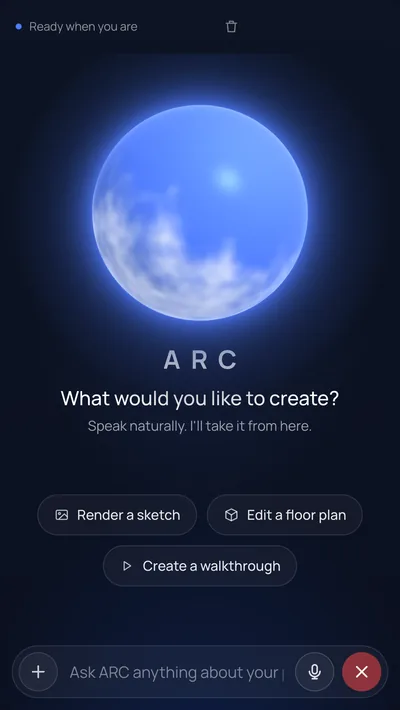
The ARC page in Archify: a glowing blue orb above “What would you like to create? Speak naturally. I'll take it from here.”, three suggestion chips — Render a sketch, Edit a floor plan, Create a walkthrough — and a bar at the bottom to type or talk
The ARC page: What would you like to create? Speak naturally. I'll take it from here.

Real Output · October 23, 2026

One conversation with ARC, four results

Four asks typed into ARC on our own account, on the live site. ARC picked and ran every tool itself; each wait is measured from submit to the result on screen. This is the session our ARC video is cut from — nothing was made for this page.

Concept render made by ARC with Imagine AI: a concrete-and-glass house cantilevered over a red-rock canyon at golden hour, an infinity pool on a round terrace, warm lights on insideConcept render

01 · Concept render

A house from a description, in 44 s

Typed to ARC: “Use the Imagine AI tool with the vertical aspect ratio: a mansion on a red-rock canyon rim, board-formed concrete and floor-to-ceiling glass cantilevered over the drop, a long infinity pool leading to the open pivot door, low golden-hour sun, warm lights on inside, elevated three-quarter view across the pool.”

Imagine AI · 100 credits + 25 for the reply

Made from a typed description — no image · result on screen in 44 s (measured)

Every step after this one was made from this render, asked for in plain words.
02 · Walkthrough clip

Typed to ARC: “Make a ten-second walkthrough of this.”

Cinematic Shots (walkthrough, 10 s) · 600 credits + 25 for the reply

Made from the concept render · result on screen in 2 min 58 s (measured)

Pro, Studio and multi-seat plans. ARC held it and asked first — 600 credits is over its 500-credit line — and ran it after the yes.

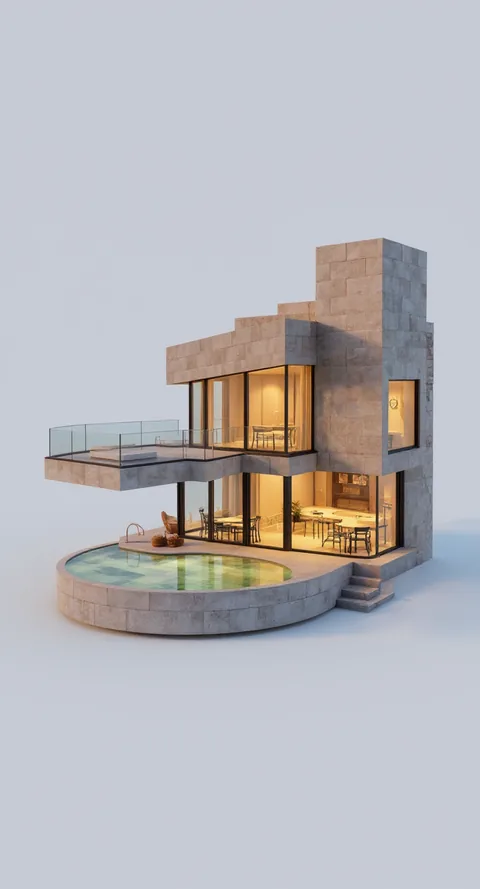
Isometric view made by ARC from the canyon concept render: the same house as a stone-clad model on a pale background, its glass floors lit and the round pool in front

03 · Isometric view

Typed to ARC: “Make an isometric view of the render, same golden light.”

Isometric View · 100 credits + 25 for the reply

Made from the concept render · result on screen in 34 s (measured)

04 · 3D model

Typed to ARC: “Now build the 3D model from that.”

3D Studio image-to-3D · 400 credits + 25 for the reply

Made from the isometric view — one image · result on screen in 7 min 14 s (measured)

The 4 asks come to 1,300 credits at today's prices — 4 replies plus 4 tools. The 3D model is shown turning one full circle in the 3D viewer.

How It Works

Ask, run, confirm, keep going

ARC drives the same tools you use by hand, at the same prices.

01 · Ask

Say it or type it

Open ARC in Archify and tell it what you want — “What would you like to create?” is all the page asks. Point it at an image from your work, or describe a new one.

02 · Run

ARC runs the tool

It picks the Archify tool that fits — a concept render, an isometric view, a 3D model, a walkthrough clip or another image tool — runs it on the image you point it at, and says what it costs.

03 · Confirm

It asks before anything big

Anything at 500 credits or more — one action, or several in one message that add up to it — waits for your yes. Smaller jobs run straight away at their normal price.

04 · Keep going

Results land in your work

Every result is saved to your History like any other job. Ask for the next step on it — a clip, a new angle, a model — or open it in the tool yourself.

What It Costs

A reply, plus the tool it runs

ARC has no price of its own: a reply costs what a Standard Archify AI message costs, and every tool costs exactly what it costs by hand. Anything at 500 credits or more waits for your yes.

  • A reply from ARC

    25 cr

    The same as a Standard Archify AI message. Listening and speaking add nothing.

  • Concept render (Imagine AI)

    100 cr

    From a description alone — exterior, interior or layout.

  • Isometric View

    100 cr

    From one of your renders or images.

  • 3D model

    400 cr

    From one image.

  • Walkthrough clip

    600 cr

    Pro, Studio and multi-seat plans. Over ARC's 500-credit line, so it always asks first.

Pricing

ARC on Archify plans

ARC comes with Starter, Pro, Studio and every multi-seat plan, and works on a new account's sign-up credits. It is not on the Student plan. Counted below for concept renders through ARC — 100 credits for the render plus 25 credits for the reply.

Starter

$29/mo launch price

3,000 credits every month — about 24 concept renders through ARC. Archify watermark included. Unused credits roll over while you stay subscribed.

Pro

$79/mo launch price

10,000 credits every month — about 80 concept renders through ARC. Downloads with no watermark, plus the video tools. Unused credits roll over while you stay subscribed.

Walkthrough clips need Pro, Studio and multi-seat plans. See all plans and one-time credit packs.

Honest Limits

What ARC does — and doesn't

It works when you ask

ARC answers each request while its page is open: it runs the tools, opens pages and changes settings you ask for, then waits for the next one. It does not take on work of its own between requests.

A concept render is a concept

Imagine AI starts from words, not a drawing, so the render is a picture of an idea: the same description can come back as a different building, and it is not a plan to build from. For your own design, point ARC at your sketch, photo or model render instead.

Not on the Student plan

ARC comes with Starter, Pro, Studio and every multi-seat plan, and works on a new account's sign-up credits. It is not on the Student plan. Walkthrough clips need Pro, Studio and multi-seat plans, wherever you ask for them.

FAQ

ARC, answered

What is ARC?+

ARC is the voice agent inside Archify. You talk or type, and ARC runs Archify's tools for you — concept renders, isometric views, 3D models, walkthrough clips and the other image tools — on the image you point it at. It tells you what each one costs and asks before anything at 500 credits or more.

How much does ARC cost?+

A reply from ARC is 25 credits, the same as a Standard Archify AI message; listening and speaking add nothing. The tools it runs cost their normal credits: a concept render 100 credits, an Isometric View 100 credits, a 3D model 400 credits and a walkthrough clip 600 credits. So one concept render through ARC is 125 credits.

Will ARC spend my credits without asking?+

Not on anything big. A single action of 500 credits or more — a walkthrough clip, for one — is held until you say yes, and so is any action that would bring one message's total to 500 credits. Smaller jobs, like a 100 credits render, run as soon as you ask.

Which plans include ARC?+

ARC comes with Starter, Pro, Studio and every multi-seat plan, and works on a new account's sign-up credits. It is not on the Student plan. Walkthrough clips need Pro, Studio and multi-seat plans; the image tools and 3D models work on the others too.

How long do results take?+

We quote only what we measured, from submit to the result on screen, in the real ARC session on this page (October 23, 2026): the concept render took 44 s, the isometric view 34 s, the walkthrough clip 2 min 58 s and the 3D model 7 min 14 s. Queue times vary, so treat these as one run each.

When does ARC work?+

When you ask. ARC answers each request while its page is open — it runs the tools, opens pages and changes settings by voice or text — then waits for the next one.

Can I try ARC before I subscribe?+

New accounts get 1,000 credits — 500 for signing up and 500 for verifying your email. ARC works on them: that is up to 8 concept renders through ARC, reply included. Output made without a plan carries the Archify watermark and is licensed for evaluation; walkthrough clips start with Pro.

Keep Going

Related tools and guides

Say what you want to make

New accounts get 1,000 credits — 500 for signing up and 500 for verifying your email. No credit card required to start.

Get started